ExGlass: What I Learned Building a Vision Prototype
From edge detection to a training pipeline and contextual vision: the software iterations behind an experimental wearable project.
ExGlass began with an ambitious idea: a wearable device that could help a visually impaired user understand their surroundings. It was the glasses component of our wider ExPhans project for BD STEM Stars. At the proof-of-concept stage, the most interesting challenge for me was the software connecting a small camera to image processing and an alert system.
This was a team project, but I was responsible for the software development. My teammate focused mainly on the physical shell and much of the hardware assembly. I worked on the ESP32-CAM programming, image collection and training workflow, TensorFlow and TensorFlow Lite processing, and communication with the onboard alert board.
The project changed significantly as I learned what each approach could actually do. Looking back, the story is less about finding one clever model and more about improving the assumptions behind the system.
Building a pipeline I could demonstrate
The original software plan included a Flutter mobile app, with BLE for pairing and Wi-Fi for higher-bandwidth transfer. That remained a plan. I did not build the mobile app: time constraints and the complexity of the project led me to use a laptop for the heavier processing instead.
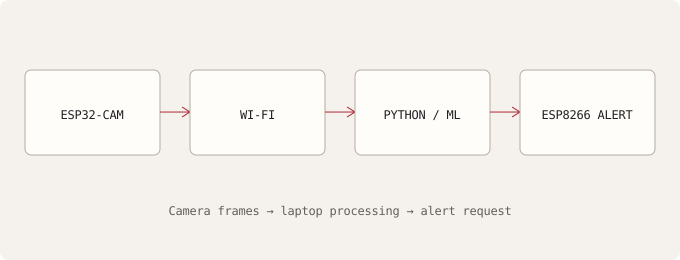
The implemented setup started with an ESP32-CAM hosting a web server and streaming images over Wi-Fi. A Python program running on the laptop fetched frames and analysed them. In the earlier classification-based version, a danger result led to a request to an onboard ESP8266, which activated a buzzer.
That separation made the prototype possible without asking the camera board to do every task. The ESP32-CAM supplied images, the laptop did the image-processing work, and the alert board handled the output. It also meant that communication between those pieces was part of the software problem, not something to think about only after the model was ready.
Trying the simplest vision approach first
My earliest obstacle-detection attempt used Canny edge detection. I wanted to test a relatively simple computer-vision method before moving into machine learning. It was a reasonable starting experiment: edges offer a way to examine structure in a frame without first collecting a training dataset.
The limitation became clear when the surroundings changed. Lighting, texture, and background clutter changed the edge patterns too much. An image full of edges did not reliably tell me whether something was dangerously close, and a different scene could produce very different results.
The useful lesson was not that edge detection was a bad technique. It was that I had asked it to answer a question that needed more information than the edges alone provided. Trying it early helped expose that mismatch before I invested everything in the approach.
Collecting data and training a classifier
I then moved to a TensorFlow model trained on labelled images from the glasses camera. I converted it to TensorFlow Lite and used it to classify scenes into two categories: “safe” and “close”.
Training made image collection a repeated task, so I built a tool called EasyTrain. It captured labelled images directly from the ESP32-CAM into safe and close folders. That reduced the friction of adding examples and gave me a more direct route from the prototype’s camera to the training dataset.
This was one of the most useful pieces of software I built for the project. A model depends on the examples used to train it, and collecting those examples should not require an awkward manual process every time. EasyTrain made it easier to continue the cycle of capturing images, retraining, and trying the updated classifier.
The classifier did work in some controlled or familiar scenes. But its limitations were still substantial. A scene label from one camera image was not a dependable measurement of obstacle distance. More training examples could help with particular situations, but they could not remove that basic difference between the input and the question I wanted answered.
Iterating under presentation pressure
The presentation made the practical cost of that workflow very clear. On the day, I had to connect remotely to my PC at home, add new training images, retrain the model, transfer it back, and redeploy it on the presentation laptop.
It was stressful, and it was also a concrete lesson in development workflow. Collecting data, training a model, moving the result, and running it on another machine were all part of the system I had built. They influenced how quickly I could respond when the demonstration environment differed from the one I had prepared for.
That experience taught me the value of staying calm and working through the next available step. It also helped me recognise that a successful adjustment for one demonstration was not evidence that the classifier would behave reliably in unfamiliar environments.
Giving different tasks different inputs
After the BD STEM Stars presentation, I changed the design. I added an ultrasonic sensor for direct obstacle-distance awareness and built a new Python vision pipeline that fetched images from the ESP32-CAM and sent them to an OpenAI vision model for contextual scene analysis.
The software now had a more sensible division of responsibilities. Direct distance sensing addressed the proximity question, while image analysis supplied richer descriptions of the surroundings. The camera no longer had to serve as the only basis for deciding whether something was close.
This was a change in the architecture, not just a replacement model. The earlier version linked classification to the onboard alert request. The later work explored contextual vision alongside distance sensing. I would not describe the vision model as a guaranteed safety mechanism or suggest that this made the device ready for independent real-world use.
What the prototype established—and what it did not
I did not carry out formal testing with visually impaired users because I did not have access to suitable test participants. Informal testing by classmates was useful, especially in showing how limited the early classifier was, but it was not a substitute for evaluating the intended use with the intended users.
I therefore describe ExGlass as an experimental proof of concept. I do not have a formal accuracy figure or a basis for claiming reliable navigation or hazard avoidance. The software demonstrated a camera-to-processing pipeline, a training workflow, and communication with an alert board; those are meaningful results without turning them into stronger claims.
What I value most is the progression. I tried an approach, observed where it failed, built tools to make iteration easier, and eventually changed the design when the original assumption no longer held up. ExGlass taught me that improving software sometimes means asking a different question of the data, rather than training the same answer harder.
The ExGlass system repository contains the project software.
Related articles
Velsat: Building the Software Behind a CanSat
Turning sensor readings into radio telemetry, and learning what it takes to connect embedded code to a working team system.